
Appearance
03 — Investor / Capital Partner Portal Manual (crm.thebridgefinance.lk)
The Investor Portal (/crm/investor) enables accredited capital partners to configure their profile and settlement bank account, submit capital mandates up to LKR 20,000,000, track monthly interest payouts with 5% Sri Lankan Withholding Tax (WHT) breakdowns, download statements, submit partial reduction or full exit requests, message advisors, and book consultations.
1. Account Registration & Sign-In
- Open
https://crm.thebridgefinance.lk/crm/registerand select Investor / Capital Partner. - Provide Full Name, Email Address, and Phone Number.
- Verify the 6-digit email OTP sent from
The Bridge Finance <noreply@thebridgefinance.lk>(valid for 5 minutes). - Authenticated investor sessions route to
/crm/investorwith a canonicalINV-XXXXXXreference number.
2. Sidebar Navigation Overview
| Group | Item | Path / Hash | Function |
|---|---|---|---|
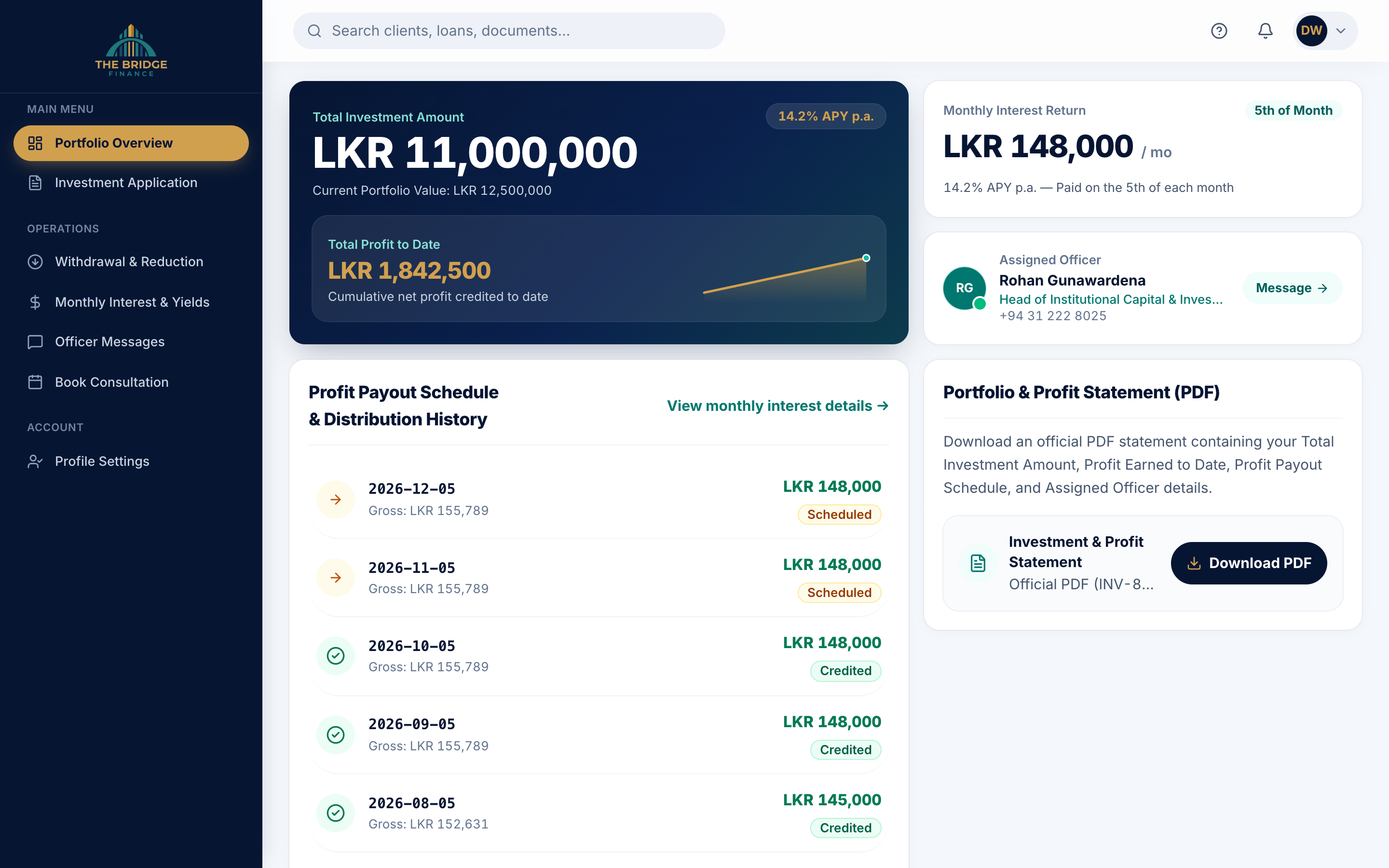
| MAIN MENU | Portfolio Overview | /crm/investor | Total Invested, Profit to Date, Payout Schedule preview, PDF Statement download, Assigned Advisor card |
| MAIN MENU | Investment Application | /crm/investor#onboarding | Submit or manage capital mandate application (up to LKR 20,000,000) |
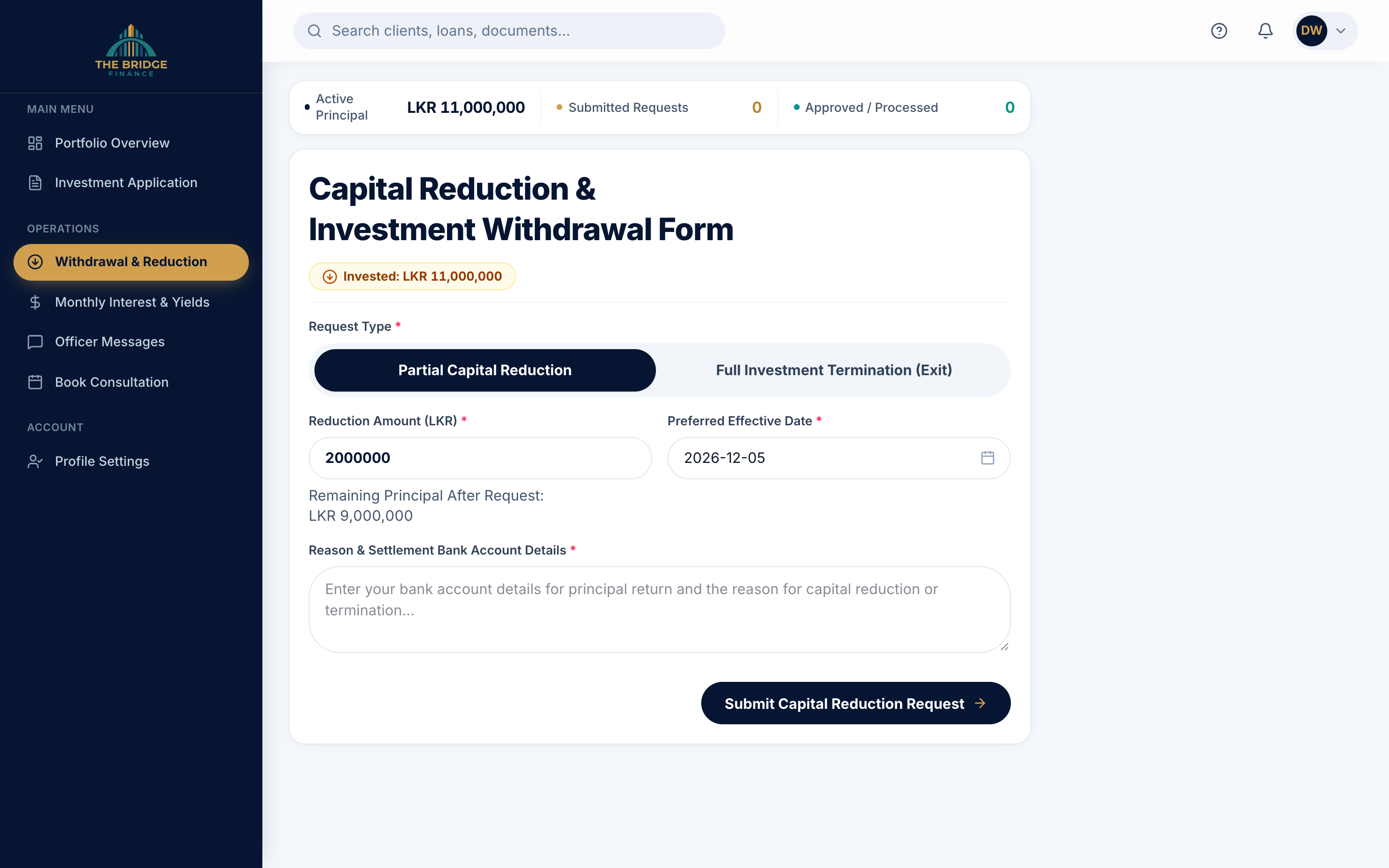
| OPERATIONS | Withdrawal & Reduction | /crm/investor#withdrawal | Request partial capital reduction or full exit withdrawal |
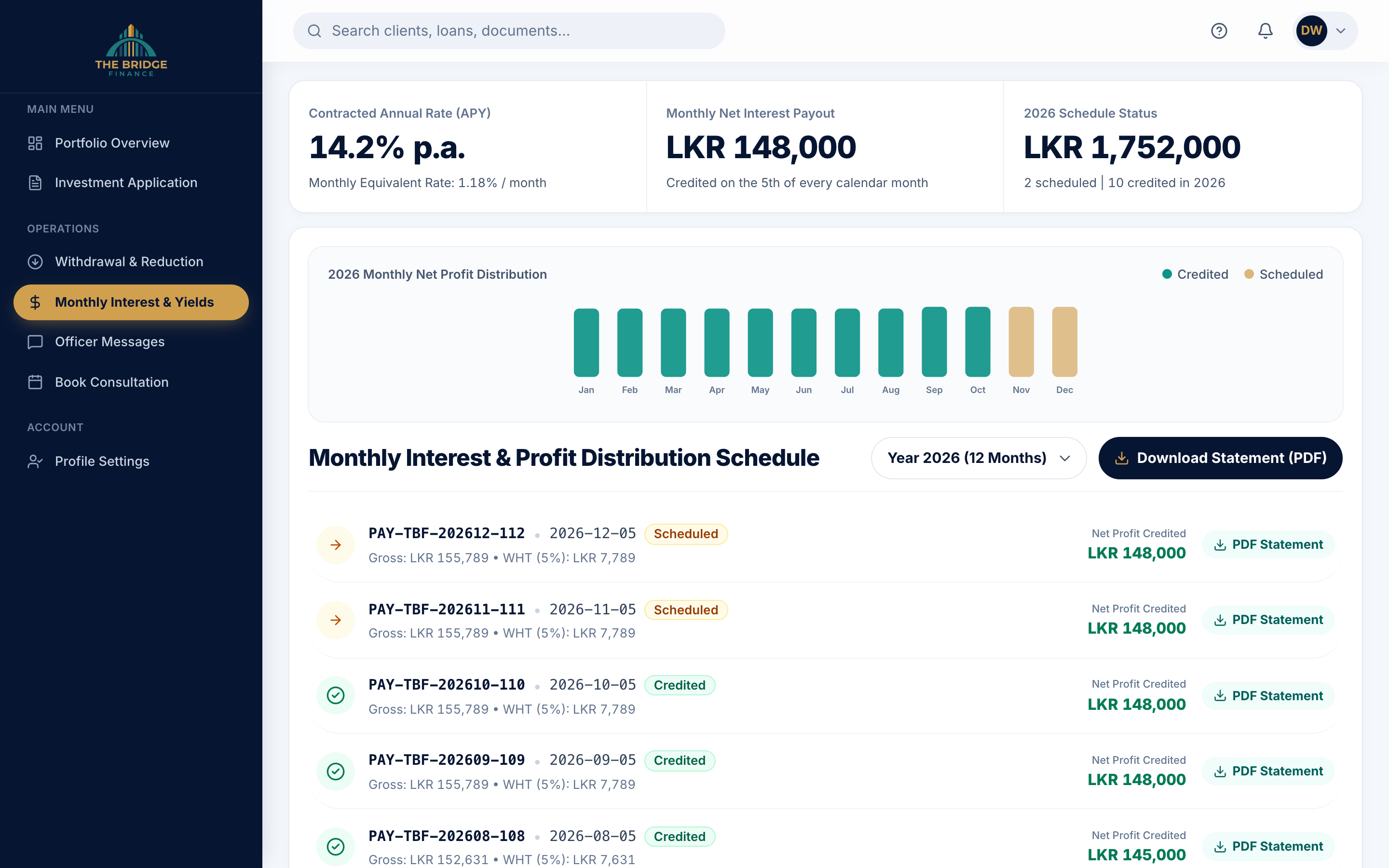
| OPERATIONS | Monthly Interest & Yields | /crm/investor#payouts | Full monthly payout table with gross yield, 5% WHT, net yield, and year filter |
| OPERATIONS | Officer Messages | /crm/investor#messages | Live direct messaging with assigned Wealth Advisor |
| OPERATIONS | Book Consultation | /crm/onboarding?type=consultation&topic=investor | Schedule portfolio consultation (requires completed profile) |
| ACCOUNT | Profile Settings | /crm/investor#profile | Investor contact identity, residential address, NIC/Passport, and payout bank account |
3. Completing Profile Settings (Prerequisite)
Before submitting an investment application, reduction/withdrawal request, or consultation booking:
- Open Profile Settings (
/crm/investor#profile). - Complete Full Name, Email Address, Phone Number, Residential Address, identity number, and Settlement Bank Details (Bank Name, Account Number, Branch, Account Holder Name).
- Click Save Profile.
4. Submitting an Investment Mandate
Open Investment Application (/crm/investor#onboarding):
- Complete your profile first (an alert blocks submission if profile fields are incomplete).
- Specify Investment Amount (LKR) (maximum cap: LKR 20,000,000), Tenure (Months), Payout Frequency, optional Organisation, and notes.
- Save as draft (
bridge_investor_application_draft/ D1investor_application_drafts) or submit (POST /api/crm/investor/application). - Editing & Locking Rules:
- Before approval (
submitted/under_review/moreInfo), you can edit or delete the application fromSubmittedInvestorApplicationView. - Once a mandate is approved/active under contract, editing and deletion are locked (
Active approved investment contracts cannot be deleted until the contract is completed or cancelled).
- Before approval (
5. Monthly Interest, WHT Statements & Portfolio Overview
- Portfolio Overview (
/crm/investor):- Displays Total Invested, Profit to Date, upcoming payout card, Assigned Relationship Advisor, and Download Portfolio Statement (PDF/Text) (
download-investor-statement-pdf-btn).
- Displays Total Invested, Profit to Date, upcoming payout card, Assigned Relationship Advisor, and Download Portfolio Statement (PDF/Text) (
- Monthly Interest & Yields (
/crm/investor#payouts):- Use the Payout Year dropdown (
payout-year-select) to filter installments by calendar year. - Each row shows scheduled date, Gross Monthly Interest, Withholding Tax (5% WHT), Net Amount Credited, reference number (
PAY-...), and status (Credited,Processing, orScheduled).
- Use the Payout Year dropdown (
6. Capital Reduction & Full Withdrawal Requests
Open Withdrawal & Reduction (/crm/investor#withdrawal):
- Select Request Type:
- Partial Capital Reduction (
partial_reduction): Specify amount to redeem and remaining active capital balance preview. - Full Investment Exit (
full_exit): Close and settle the full mandate principal.
- Partial Capital Reduction (
- Enter settlement instructions / reason and preferred effective date.
- Submit (
POST /api/crm/investor/requests). Track status (Under Review,Approved,Rejected) in the Submitted Requests list below the form.
7. Messaging, Consultations & PWA Payout Reminders
- Officer Messages (
/crm/investor#messages): Direct real-time message thread with your assigned advisor (crm_chat_messages). - Book Consultation: Uses
/crm/onboarding?type=consultation&topic=investorto select date and slot. - PWA Notifications: Enable native alerts in the header bell popover to receive automated reminders 1, 3, or 7 days before scheduled monthly yield payout dates (
/crm/investor#payouts).